
FAQ's
E-Payables FAQ's
Partnered with US Bank and Visa Commercial Credit Card
- Why has Caltech decided to start this initiative? Caltech is focused on optimizing our Procure-to-Pay process with an emphasis on reducing cost (reducing the cost of processing paper checks) and streamlining operations.
- What is Payment Plus? Payment Plus is U.S. Bank's term for their e-Payable virtual card program.
- How do suppliers enroll for Payment Plus? Suppliers who currently accept credit card payments, can begin this new payment arrangement by completing the below information (include multiple remittance addresses as appropriate) and send it to the Caltech Enrollment Team at [email protected] or by fax at 866-935-4843.
Company Name:
Remittance Address:
City:
State:
Zip:
Contact Name:
Contact Title:
Contact Phone:
Remittance Email:
CVV2 Required:
[Yes] [No] What is this?
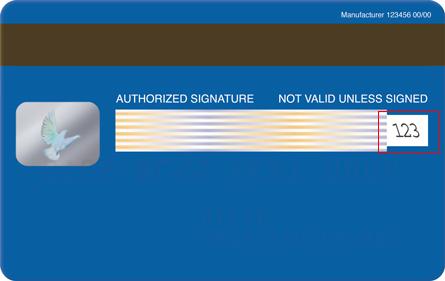
*This is either a Receivable Department email or designated person to process card transaction payments.
By providing a telephone number for a cellular phone or other wireless device, including a number that you later convert to a cellular number, you are expressly consenting to receiving communications — including but not limited to prerecorded or artificial voice message calls, text messages, and calls made by an automatic telephone dialing system — from U.S. Bank and our affiliates and agents at that number. This express consent applies to each such telephone number that you provide to U.S. Bank now or in the future and permits such calls for non-marketing purposes. Calls and messages may incur access fees from your cellular provider.
Suppliers who are not currently set up with a merchant account, should arrange for basic Visa card acceptance, and should contact their corporate banking service provider or contact U.S. Bank's preferred credit card service provider, Elavon. Elavon is a bank card acquirer that specializes in business-to-business transaction processing. Suppliers can reach an Elavon Account Manager at 1-877-371-9530 or by email at [email protected]. Once this step is completed suppliers should contact the Caltech Enrollment Team at [email protected] or call (Enrollment Team Phone number to be setup) to complete the remaining steps as noted above.
4. Where can more information about accepting Visa card payments be found?
Comprehensive information is available on Visa.com at https://usa.visa.com/support/small-business/regulations-fees.html. Merchants will find materials related to card acceptance guidelines, Visa operating regulations, and Visa interchange fees.
5. How does this shift in payment strategy change our current purchasing and payment process?
The current processes for purchase requisitions and invoices will remain the same. The only change that is being made is in payment process. All suppliers will receive an e-mail notification for each payment instructing them how to obtain the card account, the amount to process using their Point-of-Sale device/software, including other details for that transaction.
6. Are all of our suppliers being contacted for this program?
Caltech's goal is to pay as many of our suppliers utilizing Visa payment products. All suppliers that meet a number of criteria (commercial card acceptors, regularly used, currently paid by check and/or ACH) will be targeted for this program. Please direct all supplier questions relating to e-Payables to our [email protected]
7. Why should we change the current process when it is already working well?
Caltech's goal is to have leading edge Procure-to-Pay capabilities. This new process will allow both our suppliers and Caltech to better streamline operations and cost savings.
8. What benefits does e-Payables provide?
This process will streamline payment processing activities, remove risk of late payments to suppliers, eliminate material costs such as check production (paper and postage)
9. Are there any fees to our suppliers for receiving payment by Visa card payments instead of check?
Payments will be processed as credit card transactions, so standard merchant fees will apply. There are no direct fees imposed by Caltech or by the issuing bank. Caltech will also not absorb fees associated with a Suppliers Merchant Service Provider.
10. For questions about payment status, or to speak with a Caltech representative?
Please e-mail [email protected] or call the Procurement Hotline at 626-395-8900.
Payment Request FAQ's
A non-PO request is used to process payments that do not require a Purchase Order, such as employee reimbursements, mileage reimbursements, membership fees, honoraria, government fees, taxes, and other approved business expenses. Goods and services under specific categories do not require any negotiation by Purchasing Services. These requests are submitted in TechMart using a PTA Payment Request Form.
Examples include:
- Employee reimbursements
- Mileage reimbursements
- Membership fees
- Honoraria, Prizes and Award
- Government fees and taxes
- Other approved business expenses such as license and permits, contributions/donations, etc.
For more details, refer to the Payment Request Usage List. If you have questions, contact the Specialty Team at [email protected].
Start by checking the Payment Request Usage List to determine whether your payment falls within an approved payment category.
- If the payment falls within an approved category: Submit a PTA Payment Request in TechMart. Be sure to review the Exclusions listed for the applicable category. If your payment falls under an exclusion, contact your Buyer for guidance
- If the payment does not fall within an approved category: Create a TechMart Requisition. The requisition will generate a Purchase Order (PO)
- If you are unsure: Contact Procurement Services Hotline at [email protected] with a detailed description of the purchase or payment. The team can help determine the appropriate process
Quick Guide
- Payment Request Usage List → Approved category → PTA Payment Request
- Not an approved category → TechMart Requisition → Purchase Order (PO)
- Not sure → Contact Procurement Services Hotline at [email protected]
Yes. Caltech employees and students may be reimbursed for approved business-related expenses incurred on behalf of the Institute, provided the expense complies with Institute Policy and appropriate supporting documentation is submitted.
The standard processing time is 7-10 business days for requests, assuming all requirements are met and no exceptions are present. Processing times may be extended if exceptions apply such as missing documentation, insufficient business purpose, or pending supplier set up.
Yes. If your receipt is not in English, you must provide an English translation (Google translate or similar app) of the receipt details. This documentation is required for legibility and audit purposes.
No. Receipts over one year old are considered tax-reportable under the IRS Accountable Plan and must be submitted in a separate payment request from receipts that are less than one year old. Payment requests with combined receipts will be returned for correction.
IMPORTANT: Staff and students must submit reimbursement requests as soon as possible after the expense is incurred and within a reasonable timeframe. Under the IRS Accountable Plan, delayed submissions may be treated as taxable income.
Checks are generally not available for in-person pick up. However, "WILL CALL" can be arranged in special circumstances. Please contact the Specialty Team to discuss your situation and determine whether this option can be accommodated.
To locate your Payment Request:
- Click the Accounts Payable icon and select "Search for AP Requests.

2. Click the My Searches tab.

3. Click My Requests to view your Payment Requests.

For additional questions or assistance, please contact your assigned Analyst or the Specialty Team at [email protected]
To check the payment information, go to the Search field in TechMart.
1. Enter the TechMart Form Number, if known.

2. Click the Voucher Number under the Summary tab on the right-hand side.

3. Under the General tab on the left-hand side, you will see the payment
method, payment number, and payment date. If payment information is not
available, it may already be scheduled for the next payment batch. Other
reasons include monthly dark period or bank holidays. Please contact the
Specialty Team for additional questions at: [email protected].


Effective October 1, 2024, local mileage is defined as 25 miles or less one-way (50 miles or less round trip). Local mileage reimbursement requests should be submitted in TechMart using the PTA Payment Request Form. Appropriate mileage documentation must be provided showing the number of miles traveled (for example: Google Maps route).
Mileage exceeding 25 miles one-way (more than 50 miles round trip) is not considered local and must be submitted through CardQuest. CardQuest includes a built-in mileage calculator for convenience and efficiency. Refer to Mileage Policy.
Yes. A mileage map is required for all mileage reimbursement requests such as Google map or Waze, etc. The map must clearly show the route traveled between the starting location and destination and include the total mileage. Mileage calculator from CardQuest is also acceptable.
A business purpose is a brief explanation of how an expense or activity supports the Institute. The business purpose ensures that funds are used appropriately and that the reimbursement complies with the IRS Accountable Plan for non-taxable treatment. Without a valid business purpose, the reimbursement becomes taxable income to the payee.
Here are some examples of how to state a valid business purpose:
- Example #1: Business meal with research team members to discuss project updates, collaboration opportunities, and ongoing research activities.
- Example #2: Attended XYZ Science conference on July 1, 2026, to present research findings, learn about developments in the field, and support professional development. Conference held in Pasadena, CA
- Example# 3: Uber transportation to a meeting with research collaborators to discuss project progress, data analysis, and upcoming deliverables.
Acceptable proof of payment includes a clear full copy of a paid receipt indicating the payment method on the receipt, bank or credit card statement. The documentation should show that the payment was successfully made and the delivery date, if applicable. Please ensure that the documentation clearly shows the payment amount, payment date, and supplier or merchant name.
Examples of proof of payment:
- Itemized receipt showing the supplier's name, date, amount paid, and method of payment
- Merchant or credit card receipt
- A redacted credit card or bank statement showing the transaction and payment. Personal or confidential information should be obscured. Please make sure the payee's name, as well as the merchant's name, posted amount, and date, are clearly visible in the statement.
- Electronic payment confirmation (e.g., PayPal, Apple Pay, Google Pay)
- Uber, Lyft, taxi, receipts
Note: An invoice, quote, or order confirmation alone is generally not considered proof of payment because it does not verify that payment was made.
If the expense will be charged directly to a Project/Task/Award (PTA), please use the PTA Payment Request Form in TechMart. If you are charging a GL Account Number (or PTA/GL Number combination), please use the GL & Mixed GL/PTA Payment Request Form in TechMart. Download and complete the GL Payment Request Form which must be attached to the TechMart request.
If the preferred approver is no longer at Caltech, the next approver on your profile may be added, if applicable. Your Department of Custodian will need to submit a TechMart Access Request in TechMart to update the default approver information.
For additional assistance, please contact please contact TechMart [email protected].
If you do not currently have access to TechMart, your division or department of TechMart Custodian can submit a TechMart Access Request on your behalf. Once the request is approved and processed, your TechMart profile will be created, and access will be granted.
For additional assistance, please contact TechMart [email protected].
No. Payroll direct deposit is separate from Oracle Accounts Payable (AP) and does not automatically apply to non-payroll payments, such as reimbursements.
- Caltech individuals: To receive expense and travel reimbursements by direct deposit, complete the Direct Deposit – Caltech Individuals form and upload it through Secure Document Upload. Otherwise, the payment will be issued as a check.
- Suppliers: Suppliers receiving payments from Caltech may also enroll in AP direct deposit by completing the Direct Deposit – Suppliers form.
Direct Deposit Forms
Contact the Procurement Hotline to research the payment and determine whether it has cleared.
- Check: If a check has not been received within 15 business days of the issue date and the check has not been cleared by the bank, the requestor may request a stop payment. For assistance with submitting a Stop Payment Request in TechMart, please contact the Procurement Hotline or Disbursements Team
- The check will be reissued by the Disbursements Team accordingly. Damaged or stale checks should be returned to Disbursements
- The check will be reissued by the Disbursements Team accordingly. Damaged or stale checks should be returned to Disbursements
- Direct deposit: If the payee is claiming that payment was not received, the Disbursements Team will verify with the bank if electronic payment was delivered. If updates are needed to the current bank information, the payee must submit an updated Direct Deposit form through Secure Document Upload
If a poster was printed and presented at a conference or event located more than 25 miles from campus, the reimbursement request should be submitted through Travel Services as part of the travel-related expenses.
If the poster was presented at a conference or event located less than 25 miles of campus, the expense may be submitted through a PTA Payment Request.
Examples:
- Poster presented at a conference more than 25 miles from campus → Submit to Travel Services
- Poster presented at a conference less than 25 miles from campus → Submit as a PTA Payment Request
Yes. If your receipt is in a foreign currency, you must provide documentation showing the equivalent amount in U.S. dollars (USD). A screenshot of the currency conversion is acceptable.
You may use the following currency converter to determine the USD equivalent. Currency queries from another search engine are also acceptable
OANDA Currency Converter:
https://www.oanda.com/currency-converter/en/
Please use the payment or transaction date when performing the currency conversion to ensure the exchange rate is accurate. You may submit your conversion screenshot with your PTA Payment Request.
Petty Cash FAQ's
To close out a petty cash fund:
1. Complete the Petty Cash Closeout Form to access form log onto https://procurement.caltech.edu
2. Complete a Cashier Deposit Form to access form log onto https://finance.caltech.edu/TreasuryServices/Petty_Cash
3. If applicable, gather any Petty Cash Refund Slips and supporting receipts to access form log onto https://finance.caltech.edu/TreasuryServices/Petty_Cash
4. Return all unused funds to the Credit Union and obtain a signed copy of the Cashier Deposit Form.
5. Email the following documents to the Specialty Team:
Note: Do not submit petty cash closeout requests through TechMart.
For complete policy details, visit: https://finance.caltech.edu/TreasuryServices/Petty_Cash.
Please email the Specialty Team at [email protected] if you need access to the Petty Cash Replenishment Form. The Specialty Team can grant you access to the form in TechMart.
Supplier Management FAQ's
Please allow 5-7 business days to process the request. Additional time may apply if the request is missing information such as business purpose, phone number, email address, etc.
If the traveler is not appearing in CardQuest after the request has been approved and completed, search for the traveler using the following criteria:

Employee and student records are managed from the Oracle HR database. Caltech individuals must login to their personal access.caltech account and update their information such as address, email, and phone number.
Payroll and Payment Services process payments from separate systems and direct deposit forms submitted to Payroll are not forwarded or shared internally for security purposes. Please complete and submit the Payment Services' direct deposit form to receive electronic payments for your reimbursements, mileage, prize payment, etc.
To download the form, please visit the Procurement Services website.
Submit a Direct Deposit Form and select "Change" to formally request an update to the current bank information. For security reasons, banking changes typically require direct verification from the supplier, employee, or student. Supplier Management will request an updated Direct Deposit Form and validate the new bank account accordingly.
Submit a Direct Deposit Form and select "Cancel" to formally stop electronic payments. Future payments will be issued with a check. Email requests will not be accepted for security reasons.
If the vendor already exists in the supplier database, submit an Update Supplier Form in TechMart. Select the type of change needed and attach appropriate documentation such as quote, invoice, etc. Your SOS Buyer or Purchasing Buyer will send a request to Supplier Management.
If you have a pending requisition, please include a current email address PO delivery.
Yes. All address changes require a completed and signed W-9 form to ensure supplier records are updated accurately.
- If you obtained the Form W9 from a supplier, do not email it to Supplier Management. For security purposes, please upload to: Secure Document Upload
- For questions, please contact Supplier Management: [email protected]
Please refer the vendor to Supplier Management or Specialty Team. A U.S. supplier or U.S. individual must submit a revised and signed Form W-9 with current address information. Form W-9 is required for all address changes to prevent possible fraud and will be requested by Supplier Management.
- If you obtained the Form W9 from a supplier, do not email it to Supplier Management. For security purposes, please upload to: Secure Document Upload
- For questions, please contact Supplier Management: [email protected]
- For copies of 1099NEC or 1099MISC, please contact Specialty Team: [email protected]
Requirements vary depending on the type of supplier.
- US Supplier or US Individual – Supplier Registration Form, IRS Form W-9, and Direct Deposit Form (if enrolling), FTB Form 590.
- Foreign business and individuals – Require registration through Sprintax portal for tax treaty analysis; Form W8 (W-8BEN, W-8BENE, W-8ECI, etc.), visa, passport, Form 8233.
Review the supplier request in TechMart and check the Discussion section for updates from Supplier Management. This section is used to communicate questions, missing documentation, and status updates related to the request. If additional information is needed, it will be noted there. Please make sure your TechMart notifications are turned on.
The most common reasons include incomplete supplier information, missing supporting documentation, missing business purpose, duplicate supplier record, or skipped questions in TechMart. Review Discussion section for comments and resubmit the request.
The most common reason for delays is that the supplier has not completed their Sprintax registration, or the supplier is having issues with the login process. Please review the TechMart Discussion section. This section is used to communicate questions, missing documentation, and status updates related to the request. If additional information is needed, it will be noted there. Please make sure your TechMart notifications are turned on.
If the payment is time-sensitive, please consider using a US supplier, if possible. Optionally, please verify whether the supplier can accept payment through a P-Card. Make sure to review the P-Card Policy if the expense is allowed to be paid with a Caltech P-Card.
Supplier Management adds suppliers and updates vendor information in the database but does not directly issue purchase orders. When the supplier request is completed in TechMart, the assigned buyer is notified within TechMart. Please allow time for your Purchasing Buyer or SOS Buyer to review documents and approve the PO. For your urgent orders, contact your buyer.
Supplier Management adds suppliers and updates vendor information in the database but does not directly issue payments. Please allow time for Purchasing and Accounts Payable to review the request and process the invoice. For your urgent payments, please contact your AP Specialist or Procurement Hotline at x8900.
Caltech's standard payments terms are NET55 or NET15 (with e-Payables enrollment). Certain suppliers are eligible for NET30 terms such as small businesses, utility providers, independent contractors, and some university suppliers.
To enroll in the e-Payables program for quicker payments, please contact: [email protected]
Tax Reporting FAQ's and Tax Forms
Payments that may be considered taxable income include, but are not limited to:
- Human subject payments
- Honoraria
- Student fellowships and stipends
- Student prizes and awards
- Payments to artists and performers
- Legal and royalty payments
- Rent and lease payments
- Consulting and professional services
- Other reportable taxable payments
Tax reporting and withholding requirements vary based on the type of payment, the recipient's tax status, residency, and applicable tax regulations.
Yes. Tax documentation is required before taxable payments can be processed.
- U.S. citizens and U.S. tax residents: A completed Form W-9 is required and is obtained by Supplier Management.
- Foreign individuals (non-U.S. persons/nonresident aliens): The individual must register through Sprintax and complete all required tax documentation before payment can be processed. Supplier Management will provide the Sprintax registration link.
No. Foreign individuals who are expected to receive taxable income must register through Sprintax, Caltech's online tax and treaty analysis platform.
For a new payee setup, Supplier Management will send a Sprintax registration invitation directly to the payee. Because tax information is confidential, only the payee can access and complete their Sprintax profile.
Tax withholding may apply depending on the payee's residency and tax status.
- U.S. persons who are not California residents: Payments may be subject to 7% California nonresident withholding, when applicable.
- Foreign individuals (non-U.S. persons): Payments may be subject to 30% federal tax withholding and, when applicable, 7% California withholding, for a combined withholding rate of up to 37%. Actual withholding may vary based on the payment type, tax residency status, and any applicable tax treaty benefits.
Backup withholding may apply when a payee fails to provide the required tax documentation.
For U.S. and California-source income, the total backup withholding rate may be 31%, consisting of:
- 24% Federal backup withholding
- 7% California backup withholding
Yes. Gross-ups are permitted but generally discouraged as a standard practice. Departments may elect to gross up a payment; however, the department is responsible for any additional tax costs associated with the gross-up.
Tax reporting depends on the nature of the payment and whether the individual has a payroll assignment.
- If the individual has a payroll assignment, the payment will be processed through Payroll and reported on Form W-2.
- If the individual does not have a payroll assignment, the payment will generally be processed through Accounts Payable (Specialty Team) and reported on the appropriate information return, such as Form 1099, when applicable.
Foreign individuals and foreign business entities are generally reported on IRS Form 1042-S, which reports both gross income and tax withholding, if applicable. Questions regarding Form 1042-S should be directed to: [email protected].
Depending on the payment type, one or more of the following forms may be issued:
- Form 1099-MISC: Rents, prizes and awards, royalties, and other miscellaneous income paid to U.S. payees
- Form 1099-NEC: Nonemployee compensation paid to independent contractors, attorneys, and other service providers
- Form 1042-S: Income paid to foreign individuals and certain foreign entities
- Form 592-B: Payments subject to California nonresident withholding
Tax forms are mailed to recipients by January 31 of the year following payment. Forms include:
- Form 1099-MISC
- Form 1099-NEC
- Form 1042-S
- Form 592-B
If a non-employee did not receive a tax form, please contact Specialty Team at [email protected]
Questions? E-mail the following:
CardQuest: [email protected]
TechMart: [email protected]
Procurement Hotline: [email protected]
Travel: [email protected]
P-card: [email protected]
Invoice only submission: [email protected]
Payment status: [email protected]
e-Payables (Net 15-CC): [email protected]